Lenaya Health

What Lenaya does

One app for everything your doctor said.

Lenaya keeps your visits and paperwork together, ready when questions come up later. Record in the iPhone or Android app, or in your browser, then read everything anywhere. Invite family when you want their help.

Visits

Record the visit. Read it back in everyday words.

Tap once to start and once to stop. A little while later, the whole conversation comes back as something you can read, without a transcript full of medical shorthand.

  • Nothing records unless you start it. There is no always-listening mode.
  • Already have a recording? Easy. If you recorded the visit with your phone’s own recorder, on iPhone or Android, just share it with Lenaya. You get the same clear recap and to-do list.
  • Phone calls with your doctor, too. If call recording is available on your iPhone or Android phone, record the call, then share it to Lenaya. It shows up like any other visit, with its own recap and to-do list. Ask your doctor before you record, just as you would in the room.
  • A short recap and the full detail, so you can skim it or read all of it.
  • Every visit is kept, so you can go back to one from two years ago.
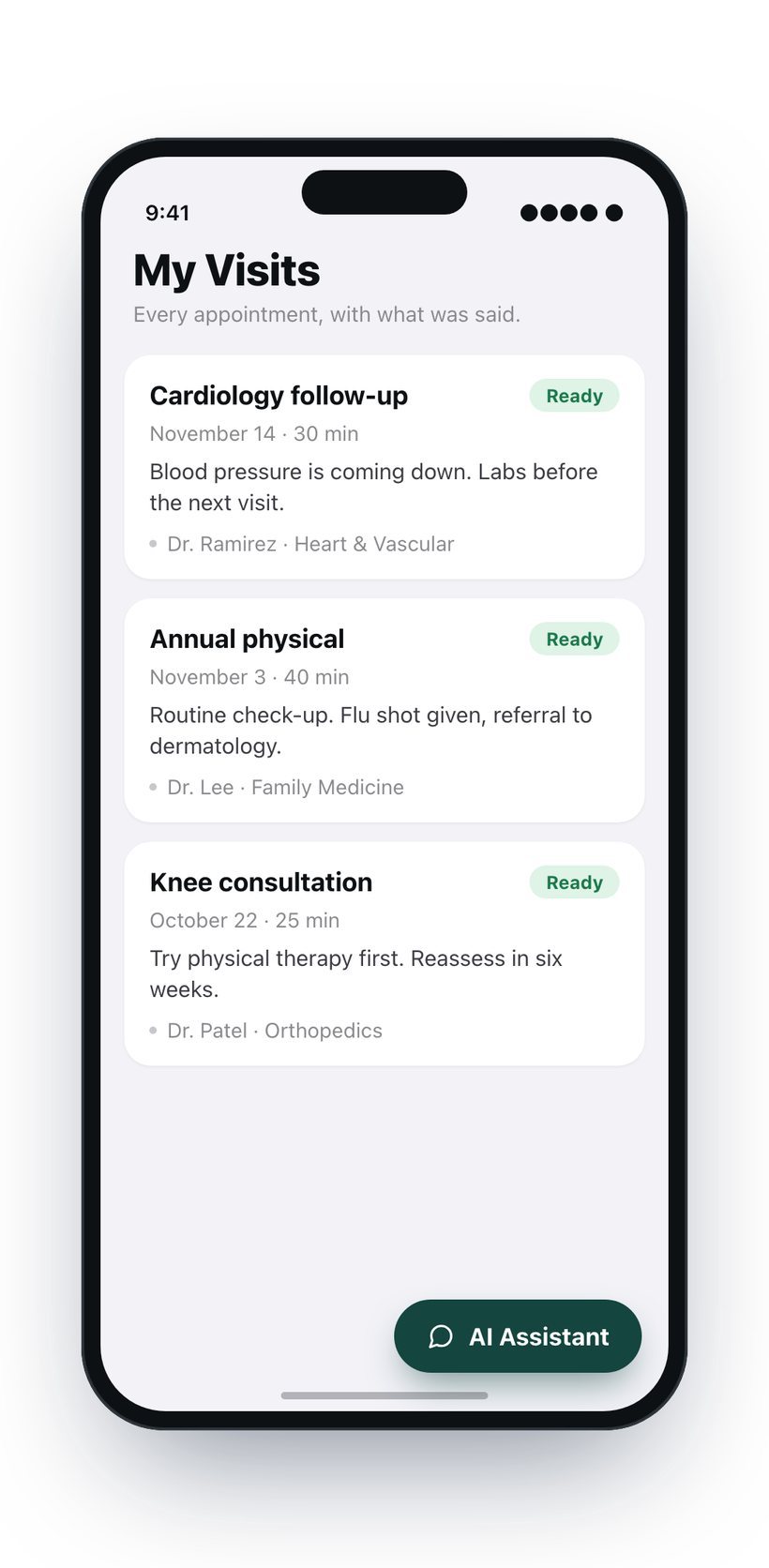
The Lenaya visit list on iPhone, showing recent appointments.
Cardiology follow-up
To-do tab · appointments and next steps
To-do

Appointments

  • Heart ultrasound with Dr. Ramirez Thursday, December 3 at 9:15 AM · Riverside Heart Clinic, 2nd floor · Wear a loose top and bring your medicine list

Checklist

  • Take the blood pressure pill twice a day Morning and night, with food
  • Stop the water pill for now Dr. Ramirez will review it at the next visit
  • Blood draw before the follow-up Any lab, no appointment needed
  • Referral to the sleep clinic Their office is sending it — call if you don’t hear by Friday
Cardiology follow-up
Summary tab · in plain language
Summary

Your blood pressure has come down since the last visit, so Dr. Ramirez wants to keep the current pill and stop the water pill for now. A blood draw before the next appointment will check how things are going, and a referral to the sleep clinic is on its way.

The to-do list and easy-to-read summary are separate tabs for each visit. The to-do tab shows your booked follow-up appointments, with their details, above the checklist. The summary has Normal, Simpler and Detailed levels. Sample content, not a real patient.

Your to-do list

The part everyone forgets, written down.

After an appointment, the easy-to-miss things are often a referral nobody called about or a medicine nobody picked up.

  • Your follow-up appointments, with the day, time, place and what to bring, so you can plan your next steps.
  • Referrals to make and appointments to book.
  • Medicines: what to start, what to stop, and when to take them.
  • What to do at home, and what to watch out for.

AI Care Assistant

The question you thought of in the parking lot.

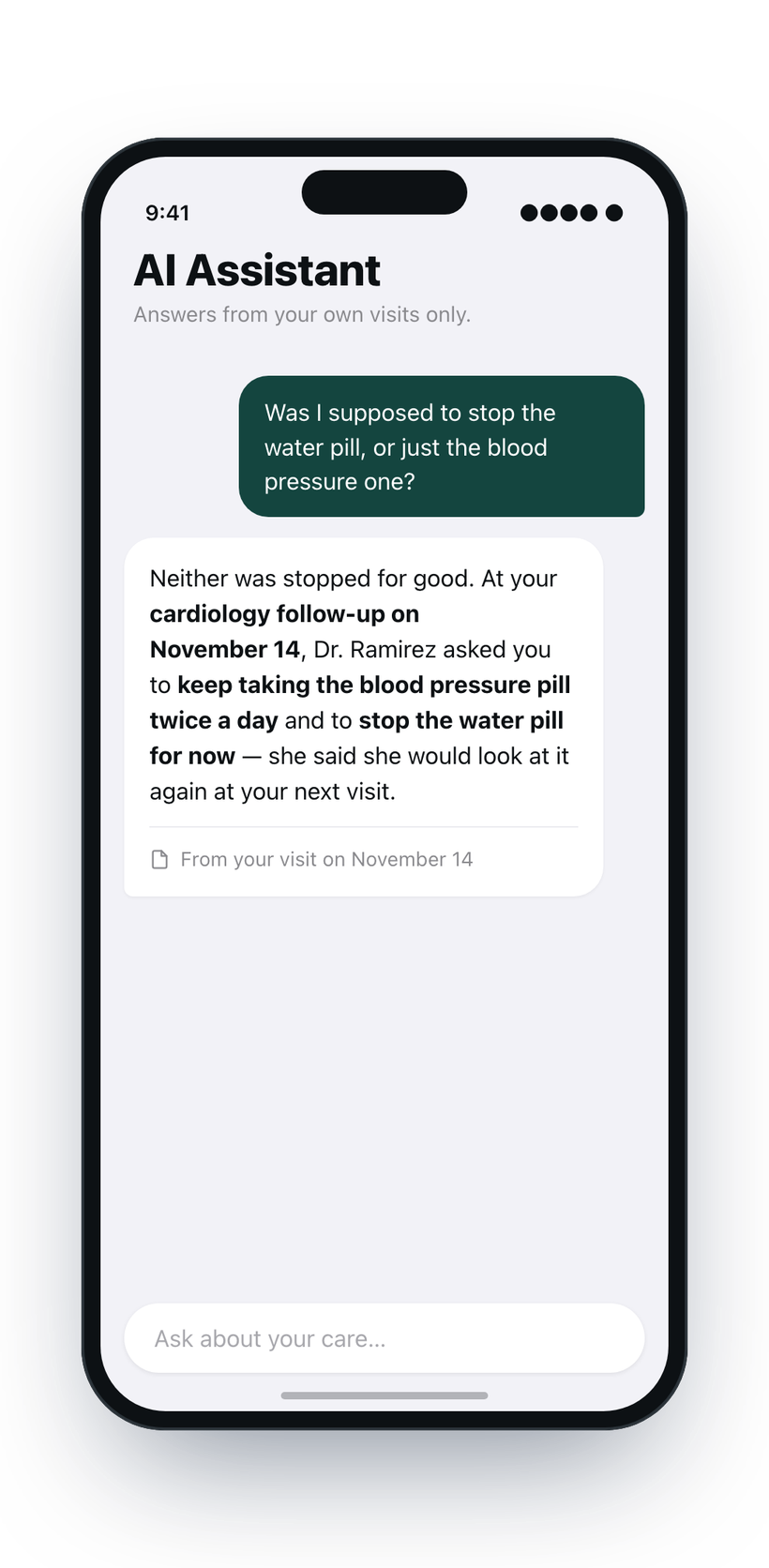
Ask the AI Care Assistant in your own words and get a clear answer. Anything it says about you comes only from your visits and documents. It never comes from the internet or anyone else’s records. It may also explain what a medical term means in general.

  • One visit or many. Ask about a single appointment, or across your visits, like “what have they said about my knee since January?”
  • Your papers and bills, too. Ask what a lab report means, or what a bill says you still owe.
  • It says when it does not know. If your records do not answer a question about you, it tells you that instead of guessing.
  • No need for another appointment just to ask about something already covered.
The Lenaya AI Care Assistant answering a question about a past visit.

Just talk

Rather not type? Say it out loud.

Tap the microphone and ask your question out loud. The assistant answers out loud, and you can keep talking with it, one question after another, the way you would with a person.

  • For when typing is hard, or when you have more to ask than you want to type.
  • The same careful answers. What it says about you still comes only from your own visits and documents.
  • About one recorded visit or across your visits, in the iPhone and Android apps and the web app.

Care Circle

Bring the people who help you.

Invite whoever helps you, whether it’s a spouse, a grown child or a caregiver. From wherever they are, they see the same visit recaps and to-do lists, so everyone starts with what the doctor said.

  • You choose what each person can do. Some can only read and stay informed. Others can ask questions, add documents, check off to-dos and record visits for you.
  • Extra questions for your circle. Care Circle adds extra questions each month to the total that you and the people you invite share.
  • You stay in charge. Change what someone can do, or remove them, at any time.
  • Add up to 10 dependents. A child or a parent who won’t sign in. Only you sign in for them, record their visits and see them, on your own plan.
  • Care Circle is different: it is for a loved one with their own account who chooses to share with you, or whom you choose to share with.

Your paperwork, too

Upload your documents. Ask about them.

Take a picture of your after-visit summary, a lab report or a bill with your phone, or upload a PDF from the web. Lenaya reads it, files it with the visit it belongs to and adds anything the paperwork says to do or not do to your to-do list.

  • Lab results, explained next to what your doctor said, so a number comes with its context.
  • What to do and what not to do, in one place, from the visit and the paperwork together.
  • The follow-ups you’re supposed to book, and by when.

It explains what your papers and your doctor said. It doesn’t give medical advice, and if your records don’t answer something about you, it says so.

Also included

Other ways to keep it all together.

Documents and after-visit notes

Every handout, report and PDF kept with the visit it came from, so nothing lives in a kitchen drawer.

Lab results over time

Your numbers, explained in words, and shown across visits so you can see which way something is moving.

My Care Journey

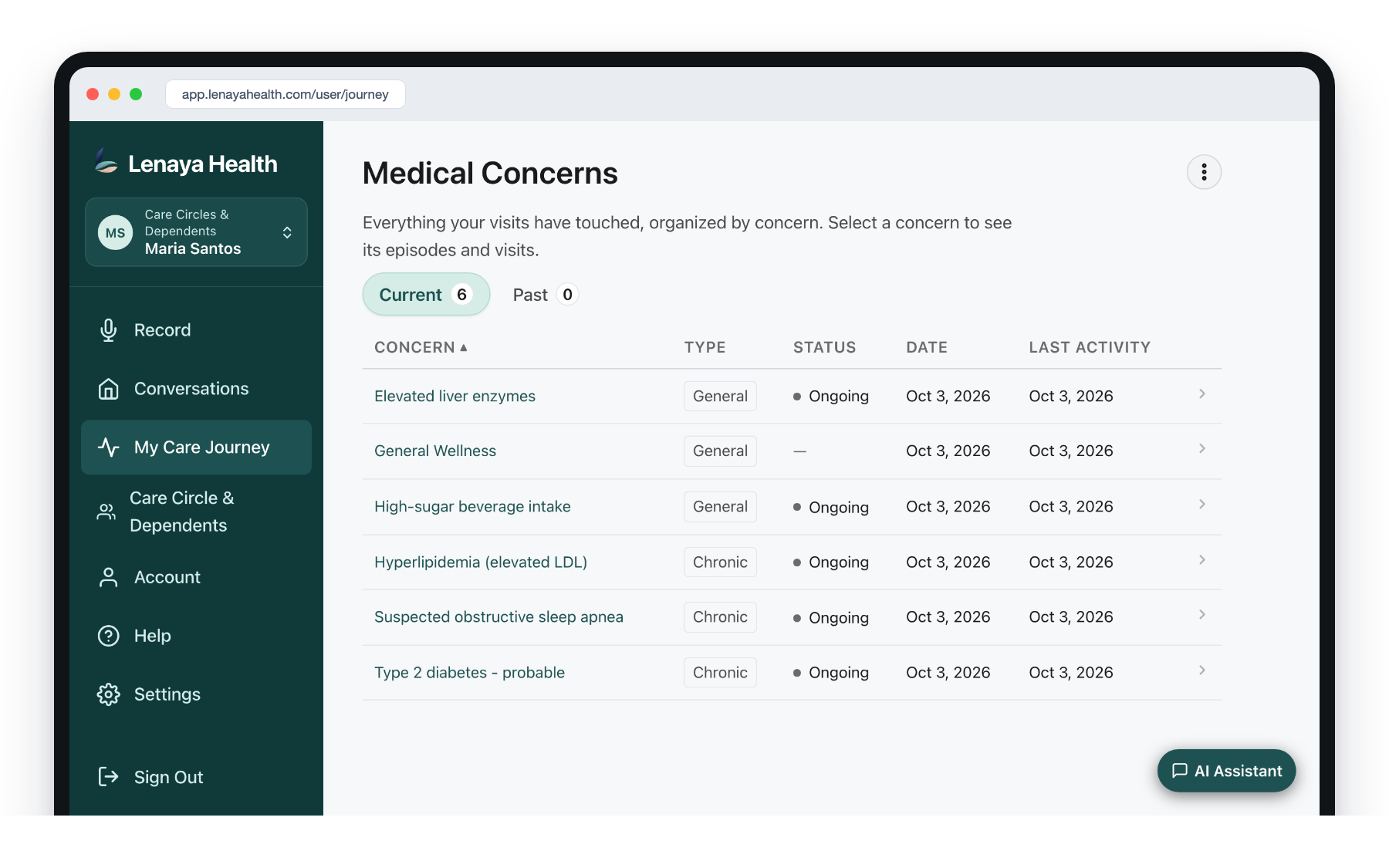
Your visits are grouped by concern instead of date, so your knee and blood pressure each have their own thread.

Phone, tablet or computer

Record in the iPhone or Android app, or use the web app on a computer or tablet. Read, search and ask on any of them. A laptop simply gives you more room.

Export or delete everything

Take a copy of your records whenever you want one, and permanently delete your account and its contents whenever you decide to.

On a bigger screen

See more of your records at once.

A year of a parent’s appointments is a lot to read on a phone. The web app gives you room to put it all side by side.

The Lenaya web app on a laptop screen: My Care Journey lists a patient's medical concerns with their type, status and dates.

Plans & pricing

Pick a plan, then add your family.

Every plan does the same things. What changes is how much room you have each month. Pay yearly and it’s 15% less.

Start here

Core

Never forget what the doctor told you.

$0/ month

Free. No credit card needed.

  • 15 recordings a month
  • 25 questions a month
  • 2 documents per visit
  • Recaps, to-do lists, labs and My Care Journey
  • Up to 10 dependents you look after
Start for free

More

When there is a lot to keep track of.

$5/ month

or $51.00 a year — 15% off

  • 30 recordings a month
  • 50 questions a month
  • 4 documents per visit
  • For specialists, hospital stays and long stretches of care
  • Up to 10 dependents you look after
Choose More

Add your family, including your pets

Add up to 10 dependents: a child, a parent, your dog or your cat. Pets are family, too, and their vet visits can stay in Lenaya with the rest of your family’s visits. Dependents do not sign in. You sign in for them, record or bring in their visits, and only you can see those visits. Dependents come with every plan, including Core, at no extra cost. Their recordings and questions use your plan’s monthly room.

Care Circle is for the people who help you

Care Circle is different from adding a dependent. It is for family members and caregivers who have their own accounts. You invite them by email. Once they accept, they sign in from wherever they are and see the same visits, recaps and to-do lists you see. Someone may live far away or have a busy day. That doesn’t mean they want to be left out. You choose what each person can do. You can remove them at any time.

  • “I couldn’t be there.” A daughter who lives three states away reads Mom’s recap that evening. She sees what the doctor said and what needs to happen next.
  • Brothers and sisters caring for a parent. One takes Dad to the doctor and records the visit. The others read the recap instead of piecing it together over the phone.
  • A husband or wife who is at work. They read the to-do list at lunch and see which prescription to pick up on the way home.
  • A caregiver who helps at home. If you give them permission, they can check off to-dos and add paperwork. Everyone can see what is done.

Care Circle can be added to any plan. Its extra questions count toward the monthly total shared by you and the people you invite.

Care Circle

Keep one person close.

+$3/ month

or $30.60 a year — 15% off

  • Invite 1 person into your circle
  • 20 extra questions a month, shared by your circle
  • They read every recap and to-do list
Add Care Circle

Care Circle Plus

Your whole support team, together.

+$4/ month

or $40.80 a year — 15% off

  • Invite 3 people into your circle
  • 40 extra questions a month, shared by your circle
  • For bigger families looking after someone they love
Add Care Circle Plus

Prices are in US dollars, plus applicable sales tax. Change plans or cancel at any time. An upgrade starts right away, and you pay only the difference for the rest of your current billing period. A downgrade starts on your next bill. You are never charged twice for the same month.

Questions

What people ask before signing up.

Am I allowed to record my doctor?

Yes, when everyone agrees. Tell your doctor you’d like to record with Lenaya so you can remember everything properly at home, and get their OK first — our Terms require it. Most say yes.

Is this medical advice?

Lenaya is designed to explain what your doctor told you, using their own words together with your lab results and the paperwork from your visits. That makes the answers personal to you — not generic advice from the internet or from a general-purpose AI.

It also connects the dots across visits, even with different doctors, so you can see your whole picture clearly — again, based on what your own clinicians told you.

It is not a substitute for your doctor, who knows you and your situation best. It does not give medical advice of its own, and it is not for emergencies — call 911 if you have one.

Are my recordings used to train AI?

No. Your recordings, your documents and your health information are never used to train AI models, and we never sell your information. Your records are shared with the people you personally invite into your Care Circle, and with the service providers that run the app on our behalf.

The full detail is in the Privacy Policy.

Where do the answers come from?

From your own care: what your doctor told you at your visits, your lab results, your documents, and any other paperwork you add to Lenaya, such as a bill. Everything an answer says about you is grounded in those records, whether you type the question or ask it out loud. It may also explain a medical term in general words. If your records don’t answer a question about you, it tells you so instead of guessing.

What happens if I cancel?

Cancelling the More plan takes you back to the free Core plan. You are not charged for the More plan again, and you keep it until the end of the time you paid for. None of your records are deleted.

Care Circle is separate. Cancelling the More plan does not stop it. You can remove Care Circle on its own, and the people you invited lose access when it ends.

The free Core plan cannot be cancelled, because there is nothing to pay for. If you want to leave Lenaya, delete your account in Settings. You can export a copy of your records first.

What if my payment does not go through?

We email you and say what went wrong. Your plan stays on for a day so you can fix it, and then we try once more. (If your bank has told us that card can no longer be used, we only try again if you have added a different card.) If the payment still does not go through, what it was for ends. If it was for the More plan, your account goes back to the free Core plan. If it was for Care Circle, the people you invited lose access and your own plan stays as it is.

None of your records are deleted, and you do not owe anything. To get it back, choose it again. You pay from that day.

What counts as a “recording” or a “question”?

A recording is one appointment you record. A question is one thing you ask the assistant, typed or spoken, and get an answer to. If an answer fails to come back, it does not count against you. Both reset at the start of each billing month.

Documents are counted per visit rather than per month, so a visit with a lot of paperwork does not use up the whole month.

What can I record with?

Your mobile phone, a tablet or a computer. Use your phone to record in person at the appointment. For a phone or video visit, put the call on speaker and record on your computer or tablet — Lenaya records what its microphone hears. In the iPhone and Android apps you can also bring in recordings you made before.

You can also record a call with your provider using the call recording built into iPhone and many Android phones, where available. Share the recording with the Lenaya Health mobile app, and it becomes a visit with its own recap and to-do list.

Reading, searching and asking work on all of them, too.

Can I record a phone call with my doctor?

Yes. Your iPhone can record phone calls, and both of you hear a short message that the call is being recorded. The recording is saved in the Notes app. Share it from there to Lenaya Health and it becomes a visit like any other, with its own recap and to-do list.

Many Android phones can record a call in their phone app too, where available. Share the recording from there to Lenaya Health.

You can do the same with a recording you made earlier, like a voice memo from an appointment.

Where is Lenaya available?

In the United States. Lenaya currently supports the US only.

Can my family and caregivers see my visits and help out?

Yes. That’s what Care Circle is for. Invite a spouse, a grown child or a caregiver by email. Once they accept, they sign in with their own account and see the same visits, recaps and to-do lists you do. They see what was said, but never hear the recording itself.

You decide how much each person can do. An Observer can read along. An Interactive member can also ask the assistant questions, check off to-dos, add documents and record a visit for you.

You can pick a date for sharing to end, or remove someone at any time. Care Circle is added to any plan: one person with Care Circle, three with Care Circle Plus.

Care Circle is for people with their own account. For a child or a parent who won’t sign in, add them as a dependent instead.

Can I keep visits for my child or a parent who won’t sign in?

Yes. Add them as a dependent — up to 10 people, on any plan. You sign in for them, pick them from the list of people at the top of the app, and record or bring in their visits.

Only you can see their visits. They are never shared with your Care Circle. They use your own plan, so their recordings and questions come out of your monthly room.

To add someone under 18, you confirm that you are their parent or legal guardian. If you remove a dependent, or delete your account, their visits and records are deleted for good.

Bring Lenaya to your next appointment.

Core is free, and you don’t need a credit card to start.

Lenaya Health records your appointments, writes them back in plain language and organizes your visits and documents. What its answers say about you comes only from your own records. It may also explain a medical term in general words. It reports what your own clinicians told you. It does not interpret your health or diagnose anything. It does not provide medical advice, and it is not a substitute for your clinician. It is not for emergencies — call 911 if you have one. Recording laws vary by state, and you are responsible for getting consent before you record.